Nest
- 3.8
- Rating
- 10.00M
- Installs
- Free
- Price

 Analysis by App-foxy
I approached Nest as a household tool rather than a novelty app. Its promise is simple: put the home within reach of your phone. That sounds useful immediately, but the more important question is what remains valuable after the first week, when checking the app stops feeling new. In my experience, the answer depends less on how often you open it and more on whether your home already uses compatible Nest products.
Developed by Nest Labs Inc., this free Lifestyle app is aimed at people who want one place to interact with their Nest setup. It is available for everyone, runs on Android 8.0 or later, and the current version is 5.86.0.4. With over ten million installs, it is clearly used as a practical home companion rather than a specialist utility. Its average rating sits at 3.8 from around 443 thousand ratings, which feels consistent with an app that can be extremely convenient for the right household but less compelling for someone without Nest hardware.
From first-week appeal to lasting household value
I find the lasting value of Nest easier to judge by looking at the small household tasks it can support than by counting how often I open it. A useful next step is to decide which checks genuinely need a phone and which are better handled in person; that distinction helps keep convenience from turning into needless monitoring. From there, the bigger question is whether those routines remain worthwhile once the first-week novelty has passed.
You May Also Like

 Blood Strike: 2.5 Anniversary
Blood Strike’s Loadouts Turn Every Drop Into a Tactical Gamble
A close look at Blood Strike’s custom loadouts: how fast access to signature weapons reshapes its battle royale rhythm, rewards preparation, and narrows the gap between fights.

 Pandora - Music & Podcasts
Pandora’s Music Is Easy to Start, but Harder to Recover
Pandora’s strength is its low-effort path from a seed to a station. Its weak spot is how much confidence it asks you to place in connection, setup, and quiet recovery.

 8 Ball Pool
 Is Built on Rivalries, Rematches, and Routine
A close look at the rivalries, rematches, shared routines, and unanswered safety questions that turn a quick pool match into a persistent mobile community.

 Samsung Music
’s Quiet Strength Is Playing What You Already Own
Its reach comes less from spectacle than from dependable access to a personal library. That simplicity is both the app’s strongest retention engine and its ceiling.

 AccuWeather: Weather Radar
AccuWeather Review: A Quick, Clear Forecast for Everyday Decisions
For everyday plans, the best forecast is the one you can understand quickly. AccuWeather makes rain timing, radar, and local conditions easy to act on, with a few trade-offs.

 Hill Climb Racing
Why Hill Climb Racing Still Turns Crashes Into One More Run
A tiny car, a bumpy hill and one more upgrade: Hill Climb Racing keeps resurfacing because its simple chaos makes every near-miss feel personal.
More From Our News Desk
View All News


The first setup feels useful when your home already has a Nest routine
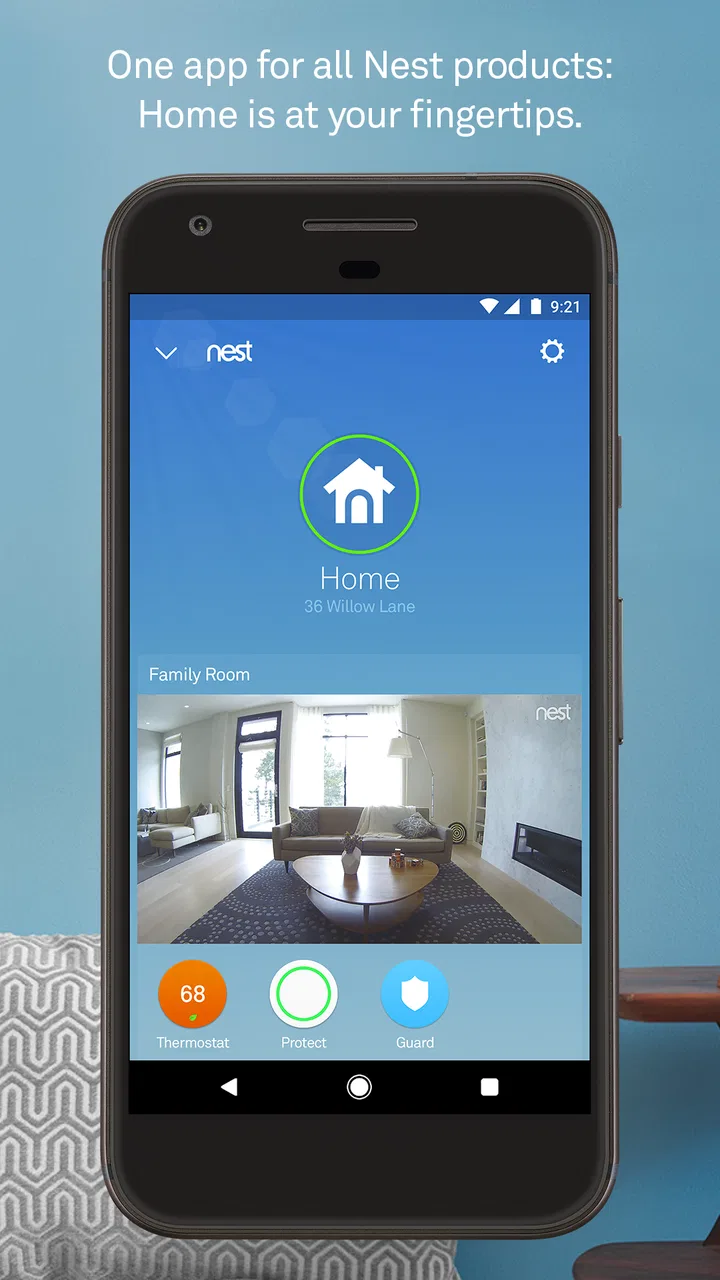
The strongest first impression comes from having a real reason to open the app. If I am away from home and want to check the state of my connected equipment, adjust something, or review an alert, having those controls gathered in one mobile experience is more comfortable than dealing with separate device-specific routines. The app makes the phone feel like a practical remote for the home, not merely another dashboard to explore.
That distinction matters. Nest is not an app I would install just to browse features. Its value appears when it connects to an existing household habit: checking before leaving, looking in after receiving an alert, or making a small adjustment without walking from room to room. The first week can therefore feel pleasantly efficient, especially for someone who has recently added a Nest product and wants a central place to manage it.
I also like the mental simplicity of having a familiar home screen instead of remembering which control belongs to which device. That can be especially helpful in a shared household, where one person may understand the equipment better than everyone else. A single app gives the home a common point of reference, even though the usefulness of that arrangement still depends on the products installed and how consistently people use them.
What I would check before committing to it
The most important question is not whether the app is free. It is whether your home is already built around Nest hardware. If you are looking for a general smart-home controller that brings unrelated brands together, I would compare alternatives before making Nest the center of your routine. This app makes the most sense when you want to stay within the Nest environment, rather than when you are starting with a completely mixed collection of devices.
That also affects the experience for renters, students, and people who move frequently. If the available equipment changes from one home to another, the app may not retain the same importance. By contrast, homeowners or families with a stable Nest setup can benefit from a consistent place to check the home. I would treat the app as part of an ecosystem, not as a standalone lifestyle download.
Another practical point is that the app should complement physical habits rather than replace common sense. I would still check a door, appliance, alarm, or room directly when the situation matters. A phone interface is convenient, but it can make a household feel more manageable than it really is if I assume every important detail is visible or controllable from the screen. The best use is as an extra layer of awareness and control.
Small workflows that make it more useful
One of my preferred ways to use a home-control app is to attach it to moments that already happen. Before leaving, I can make a quick check part of locking up. When returning from a trip, I can use the app to reconnect with what is happening at home before I arrive. These brief checks are more sustainable than opening the app repeatedly without a clear purpose.
A less obvious benefit is reducing household conversations about who last checked something. In a family, one person may notice an alert while another is away. The app can become a shared reference point, provided everyone knows how to interpret what they see. That is not glamorous, but it is the kind of small coordination that can make connected-home technology worthwhile over time.
I would also avoid turning every notification into an urgent event. During the first week, it is tempting to investigate every message immediately. A better approach is to notice which alerts actually change what I do and which ones merely add noise. That habit helps preserve attention and makes the app feel like a useful assistant rather than a source of constant interruption.
Why the second month is the real test
After the novelty fades, the app lives or dies by repetition. I do not need a home dashboard to entertain me; I need it to save time, provide reassurance, or make a recurring task easier. If it does one of those things several times a week, it earns a place on my phone. If I only open it during setup or when something goes wrong, its presence becomes harder to justify.
This is where Nest has a sensible advantage over a collection of unrelated control apps. Familiarity can lower the effort required to perform a basic check. I do not have to remember a different workflow for every piece of Nest equipment. The benefit is modest on any single day, but repeated small savings are exactly what make a household app stick.
At the same time, the app is not automatically valuable simply because it centralizes things. Centralization can expose the limits of the ecosystem as well as its convenience. If a device or service outside Nest is important to my routine, I may still need another app. In that situation, Nest becomes one part of the home rather than the complete control center, and I would judge it on how well it handles its own equipment rather than expecting it to solve every smart-home problem.
Maintenance is mostly about attention, not daily effort
The good news is that an app like this should not require a complicated daily maintenance ritual. The ongoing work is more about keeping my household habits sensible: checking the app when it matters, responding to useful alerts, and making sure other people in the home understand the same basic workflow. That is a manageable burden for a stable setup.
The less visible maintenance is psychological. Connected-home apps can encourage me to monitor things that I previously trusted without checking. If I start using the app as a reassurance loop, I may open it several times simply to feel certain that everything is fine. I consider that a warning sign. The app is most helpful when it supports a clear routine, not when it creates a new compulsion.
There is also a learning curve for anyone who is not the person who installed the home equipment. A partner, older relative, or housemate may need a short explanation of what the app shows and what action is appropriate. The interface may be straightforward once understood, but household technology still fails when only one person knows how it works. I would make sure the people who genuinely need access are comfortable before relying on the app during travel or busy periods.
Where fatigue can set in
The main source of fatigue is notification management. Alerts are useful when they point to something I should act on, but repeated low-value messages can train me to dismiss everything. I would rather receive fewer meaningful prompts than turn the phone into a running commentary on the home. Taking time to decide which events deserve immediate attention is one of the most important long-term habits.
Another source of frustration is the gap between expectation and control. The phrase “your home in your hand” suggests broad access, but the actual experience is naturally tied to the Nest products and functions available in a particular household. If I expect a universal remote for every connected object, disappointment is likely. If I see it as a focused companion for Nest equipment, the boundaries are easier to accept.
Shared access can create its own friction. A home is not a single-user environment, and changes made by one person may affect everyone else. I would establish a simple household agreement about who adjusts settings, who responds to alerts, and when a direct physical check is still necessary. That kind of agreement is not an app feature, but it determines whether the app reduces confusion or adds to it.
How it compares with ordinary alternatives
The ordinary alternative is to manage the home manually or use separate apps for separate products. Manual checks are often more dependable for immediate confirmation, but they are inconvenient when I am away. Separate apps can offer deeper control for individual devices, yet they make routine checks slower and harder to remember. Nest sits between those options: more convenient than visiting every device, but narrower than a truly brand-neutral smart-home platform.
For someone already invested in Nest, that middle position is sensible. I would rather have a coherent companion than scatter basic tasks across several interfaces. For someone comparing ecosystems from scratch, however, I would look closely at the products I expect to add later. The app may be pleasant today, but a long-term home setup should not be chosen solely because its first app feels tidy.
There is also a privacy and attention trade-off that I would consider in practical terms. A connected-home app can make the household more observable and responsive, but it also encourages more interaction between domestic life and the phone. People who prefer minimal technology at home may find manual routines calmer. People who travel, share responsibility for a property, or want remote awareness may see the same connection as a major advantage.
Who should keep it installed?
I would recommend keeping Nest installed if the app supports a recurring task that I genuinely perform: checking the home while away, handling a household alert, or making a quick adjustment without using several separate controls. It is particularly suitable for people who value a consistent home interface and are comfortable making the app part of an established routine.
I would be more cautious if I owned no Nest equipment, rarely need remote access, or want one app to manage a wide mixture of brands. In those cases, the download may offer little lasting value. A general smart-home platform could be a better fit for a varied setup, while manual checks may be preferable for someone who does not want another stream of notifications.
The age rating of Everyone makes the app broadly approachable, but that does not mean every household member should have unrestricted responsibility for the home. I would still keep the practical roles clear, especially when an alert might require a physical inspection or a decision that affects other residents.
My long-term verdict
Nest earns lasting space on my phone when it becomes part of a short, repeatable household routine. Its strongest quality is not novelty; it is the convenience of having Nest-related home interaction in one familiar place. The free price removes the barrier to trying it, and its large user base shows that many people treat it as a regular companion for their connected homes.
Still, I would not call it essential for everyone. Its usefulness is conditional on owning compatible Nest equipment and accepting the limits of a focused ecosystem. The app can also become tiring if I allow every notification to demand attention or if I expect it to replace direct checks and broader smart-home tools.
My honest recommendation is to judge it after the first ordinary month, not after the first exciting setup session. Ask whether it saves time, improves awareness, or helps the household coordinate. If the answer is yes, the recurring convenience is real, and the app deserves a permanent place. If I keep opening it only out of habit, or because I am hoping it will control products outside its natural scope, I would simplify the setup instead. Nest works best when it quietly supports a home routine rather than becoming the routine itself.
FAQs for Nest
01What features does the Nest app offer?
The Nest app provides comprehensive control over Nest devices, such as thermostats, cameras, and smoke detectors. Users can adjust temperature settings, monitor live video feeds, and receive alerts about potential safety issues. The app also integrates with Google Assistant for hands-free voice control, enhancing the smart home experience.
02Is the Nest app compatible with all smartphones?
The Nest app is compatible with most modern Android and iOS devices. Users need to ensure their operating system meets the app's requirements, typically Android 6.0 or later and iOS 12.0 or later. It’s important to check for any recent updates that might affect compatibility.
03How secure is the Nest app?
Nest prioritizes user security with robust encryption and two-factor authentication (2FA) to protect personal information and device access. Regular security updates further enhance safety. Users are encouraged to keep their app and devices updated and to use strong, unique passwords for optimal security.
04Can multiple users access the Nest app?
Yes, the Nest app supports multiple users, allowing family members or trusted individuals to access and control devices. Users can invite others via the app, granting them specific permissions for device management. This feature is useful for shared living spaces or family homes.
05Does the Nest app work offline?
The Nest app requires an internet connection to function fully, as it relies on cloud-based services for real-time updates and remote access. Some features, like local device operations, may still function without internet, but for comprehensive control and notifications, connectivity is essential.
Pros
- Intuitive user interface for easy navigation.
- Seamless integration with smart home devices.
- Customizable schedules for energy efficiency.
- Real-time alerts for home activity.
- Remote access via mobile app.
Cons
- Initial setup can be complex for beginners.
- Requires stable internet connection.
- Limited compatibility with older devices.
- Subscription needed for full features.
- Occasional app connectivity issues.

Nest
Gallery